
What can you learn about a phishing domain without touching it?
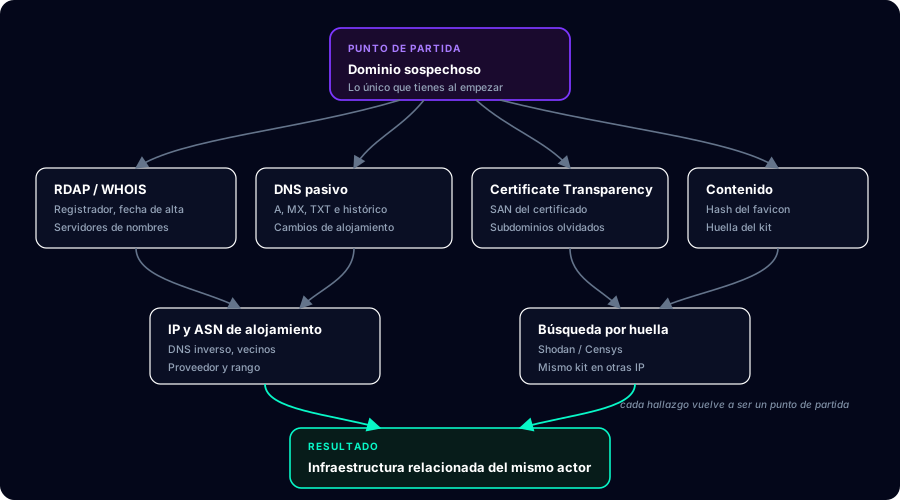
Starting from nothing but a suspicious domain you can reconstruct when it was registered, who hosts it, which other domains share its certificate or its server, which phishing kit it runs, and what else the same actor has deployed — all through public registries and third parties that have already visited the site, without sending a single packet to the attacker's server.
This guide walks that methodology in order, from most passive to most intrusive, and stops where the ground starts that can land you in legal trouble or give you away. The commands are reproducible: swap the example domain for yours and you will get real results.
You will see malicious-example.test throughout as a placeholder. I am not using a real phishing domain because malicious domains expire, change hands, and any tool output would be stale within weeks. The methodology, on the other hand, does not expire.
What counts as passive versus active, and why does it matter so much?
Before the first command it is worth being clear on this distinction, because it governs both your legal safety and the quality of the investigation:
| Type | What you do | Does the attacker see you? | Examples |
|---|---|---|---|
| Passive | Query public registries and third-party databases | No | RDAP, Certificate Transparency, passive DNS, Shodan |
| Semi-passive | Interact with public infrastructure but not the target | Not directly | DNS resolution against a public resolver |
| Active | Send traffic to the attacker's server | Yes | Visiting the site, port scanning, directory brute-forcing |
The way to see the content without exposing yourself is to delegate the visit: urlscan.io browses on your behalf and returns a screenshot, the DOM, the request chain and certificates. If you use it, do so unlisted: a public scan tells the attacker someone is looking, because operators monitor these platforms for their own domains.
A writing convention: indicators are always defanged (hxxps://, example[.]com) so nobody opens them by accident when copying from a report. Adopt it from your very first note.
What do the headers of the email that carried the link tell you?
If the domain reached you by email — the usual case — the message headers are the richest source in the whole process and the one most people skip. Always ask for the complete original message (.eml), not a screenshot or a forward: forwarding an email destroys the original headers, which are exactly what you need.
The hop chain
Received: headers read bottom to top: the lowest one is the first server that touched the message and is usually the most revealing, because everything above it is already legitimate transit infrastructure. That is where the true originating IP appears and, with luck, the sending software.
The mismatch that explains why SPF isn't enough
This is the point separating serious analysis from a surface reading. SPF validates the envelope domain (Return-Path), not the one the user sees in From. An attacker can register their own domain, give it a perfect SPF record, and send from it an email whose visible From claims to be your bank: SPF passes and the user sees a spoofed sender. That is why DMARC matters — it is what requires both domains to be aligned.
Authentication-Results: mx.example.com;
  spf=pass       smtp.mailfrom=attacker-domain.test
  dkim=pass      header.d=attacker-domain.test
  dmarc=fail     header.from=impersonated-brand.com

Return-Path: <bounces@attacker-domain.test>
From: "Brand Support" <support@impersonated-brand.com>| Header | What to look for | Why it matters |
|---|---|---|
Received | The IP in the lowest hop | True origin of the send, before legitimate transit |
Authentication-Results | spf, dkim and dmarc results | A dmarc=fail alongside spf=pass exposes From spoofing |
Return-Path | Whether it matches the From domain | The mismatch is the classic phishing signature |
Message-ID | Format and right-hand domain | Lets you group sends from the same platform |
X-Mailer | Sending software name | Identifies bulk mailers or scripts on compromised hosts |
Reply-To | Whether it points somewhere other than From | Often reveals the mailbox the actor genuinely controls |
What does the domain registration tell you?
The first step is pulling the registration data. Today you should reach for RDAP rather than WHOIS: it is the protocol replacing it, returns structured JSON (instead of free-form text that differs per registrar) and is standardised in RFC 9083.
# rdap.org automatically redirects to the RDAP server for the TLD
curl -s https://rdap.org/domain/malicious-example.test | jq '{
  registrar: .entities[]?.vcardArray?[1]?[]? | select(.[0]=="fn") | .[3],
  events:    [.events[] | {action: .eventAction, date: .eventDate}],
  status:    .status,
  ns:        [.nameservers[]?.ldhName]
}'whois.What actually matters in that output:
| Field | Why it matters | Red flag |
|---|---|---|
| Creation date | Phishing runs on freshly created, short-lived domains | Registered less than 30 days ago |
| Registrar | Some registrars concentrate abuse through price and laxity | Registrar with a known abuse history |
| Name servers | Let you group campaigns by the same actor | Unusual or self-hosted NS |
| Registrant privacy | Near-universal today, so it says little on its own | Only useful when real data leaks by mistake |
| EPP status | clientHold or serverHold mean it has already been reported | Their absence suggests the campaign is still live |
How do you spot a domain that visually imitates another?
Internationalised domain names allow non-Latin characters, and that is where the homograph attack lives: the Cyrillic "а" (U+0430) is visually identical to the Latin "a" (U+0061), but they are completely different domains. At a glance, in an email, they are indistinguishable.
Under the hood those domains are encoded in Punycode (RFC 3492), recognisable by the xn-- prefix. The check is trivial and worth running any time a domain "looks" legitimate:
# If the result starts with xn--, the domain contains non-ASCII characters
>>> "аpple.com".encode("idna")
b'xn--pple-43d.com'

# The same domain written with a Latin "a" is unchanged
>>> "apple.com".encode("idna")
b'apple.com'Modern browsers mitigate this by displaying the xn-- form when a domain mixes scripts, but mail clients do not always do the same, and that is where the attack still works. If you are documenting a case, always record the Punycode form alongside the visual one: it is the only unambiguous representation.
Homographs are only one imitation family. The rest can be enumerated and checked in one pass with dnstwist, which we saw earlier: lookalike character substitutions, omitted or doubled letters, inserted hyphens, alternative TLDs, and subdomains that place the brand to the left of the real dot (your-bank.com.attacker-domain.test) — the variant that fools people most on mobile screens.
How do you pivot from the IP address?
With the current resolution and, better still, the resolution history (passive DNS), you can group campaigns by shared infrastructure.
# Current resolution and associated records
dig +short malicious-example.test A
dig +short malicious-example.test MX
dig +short malicious-example.test TXT

# Reverse DNS on the resulting address
dig +short -x 203.0.113.10

# SPF TXT record: sometimes reveals the actor's mail providers
dig +short malicious-example.test TXT | grep -i spf
The next hop is asking what else lives on that IP. Here is the nuance that separates people who know from people who don't: if the address belongs to shared hosting or sits behind a CDN, the "neighbours" are thousands of unrelated legitimate sites and the correlation is worthless. Always check the ASN and hosting type before concluding two domains are related because they share an IP.
| Hosting type | Is shared IP meaningful? | What to do |
|---|---|---|
| Dedicated server or VPS | Yes, a strong signal | Enumerate neighbouring domains |
| Shared hosting | Very weak | Needs confirmation by another route |
| Behind CDN or reverse proxy | No — the IP belongs to the CDN | Find the origin IP another way |
How do you spot the same phishing kit on other servers?
Phishing kits are distributed as packages and deployed as-is, which leaves identical fingerprints across every deployment. The most useful is the favicon hash: Shodan and Censys index it, so once you have the campaign's favicon hash you can find every other machine on the internet serving that exact icon.
# Favicon hash in the format Shodan indexes (MurmurHash3 over the
# base64-encoded content). Requires: pip install mmh3 requests
import base64
import mmh3
import requests

resp = requests.get("https://urlscan.io/liveshot/?url=...", timeout=20)
favicon_b64 = base64.encodebytes(resp.content)
print(mmh3.hash(favicon_b64))

# Search the resulting value in Shodan as: http.favicon.hash:<value>Other fingerprints work just as well: the exact page title, kit-specific paths, strings from the exfiltration JavaScript, or the combination of HTTP response headers. Any constant of the kit is a usable pivot.
For the other side of the problem — which lookalike domains have been registered against you — the tool is dnstwist, which generates typographic permutations of a legitimate domain and checks which are registered:
# Only domains that are actually registered, with their resolution
dnstwist --registered your-brand.com
How do you document all this so it is actually useful?
An investigation without a report is wasted time. And a report without confidence levels is worse than nothing, because it drives bad decisions. Always separate what you observed from what you inferred:
| Confidence | What justifies it | Example |
|---|---|---|
| High | Directly observed in a verifiable public source | Domain registered on 12 July (RDAP) |
| Medium | Correlation over infrastructure that isn't massively shared | Shares a dedicated VPS with two other domains |
| Low | Coincidence with a plausible alternative explanation | Same registrar as another campaign |
The final indicator table should always be defanged and sourced, so whoever receives it can reproduce your work:
Indicator                          Type      Confidence  Source
malicious-example[.]test           domain    High        RDAP + CT
admin.malicious-example[.]test     subdomain High        crt.sh
203.0.113[.]10                     IPv4      High        dig A
-1234567890                        favicon   Medium      Shodan
other-campaign[.]test domain Medium Shared SANThe lines not worth crossing
- Don't submit fake credentials into the form. It is tempting to see what the kit does, but it is active interaction and it pollutes the attacker's data with noise somebody later has to interpret.
- Don't port scan or brute-force directories without explicit authorisation. In many jurisdictions unauthorised access to a system is a crime, and the system belonging to a criminal is not a defence.
- Don't download the kit from an exposed backup archive unless you have a formal engagement that covers it.
- Don't make your scans public on urlscan and similar while the investigation is still open.
- Don't confuse correlation with attribution. Sharing a hosting provider does not make two campaigns the same actor.
The step up from here is moving from investigating a single domain to tracking whole campaigns over time, correlating infrastructure and mail headers. That route, with labs built on real cases, is the Phishing with OSINT path; if you would rather start from the fundamentals, the entry point is the beginner course.